After-Call Workflow Software for Sales Teams
Stop losing call context. Custom forms appear after calls so reps log outcomes, notes, and next steps every time.
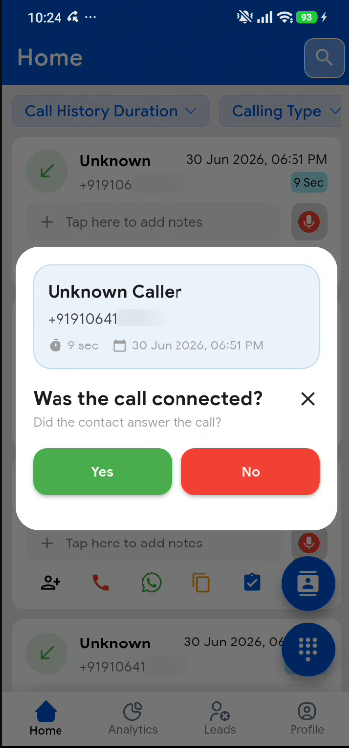
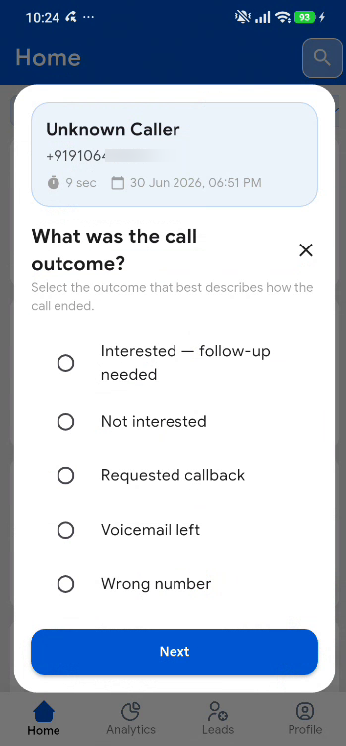
After-call workflow software opens a form on the rep's Android phone when the call ends. The answers — outcome, note, next step — attach to that call and to the lead. Managers read them on the dashboard instead of chasing a WhatsApp update.
Custom Form Builder
Create multi-step after-call forms with fields, options, and conditional logic tailored to your sales process.
Automatic Prompt After Calls
Forms appear on the rep's phone right after a call ends — while details are still fresh.
Linked to Call Logs & Leads
Every submission attaches to the call record and lead profile for full conversation history.
What happens when the call ends
The rep dials from the normal phone app on the work SIM. When the call finishes, Callytix shows the form the manager built. Required fields wait for an answer. Optional fields can be skipped.
This is sales cleanup, not live call barging. Nobody else is on the line. The form is how the team keeps the reason for the call.
Why Teams Choose Callytix
Custom Form Builder
Create multi-step after-call forms with fields, options, and conditional logic tailored to your sales process.
Automatic Prompt After Calls
Forms appear on the rep's phone right after a call ends — while details are still fresh.
Linked to Call Logs & Leads
Every submission attaches to the call record and lead profile for full conversation history.
Manager Review Dashboard
Review submissions centrally and spot reps who skip post-call data entry.
Frequently Asked Questions
Related Solutions
Smart Auto-Dialer & Calling List Software for Android
Eliminate manual contact picking. Run automated calling campaigns directly from your team's Android SIM cards with automated list sequencing and post-call workflows.
Telecalling CRM with Built-In Call Tracking
Stop juggling a CRM and a call tracker. Callytix combines lead management and call analytics in one platform.
Lead Management Software for Sales Teams
Assign leads, track follow-ups, and connect every conversation to your pipeline — with call data built in.
Ready to Get Started?
Start your 7-day free trial. No credit card required.